


Shopping List - Enchan Li
4.326.00 Reviews
App Specs
- Version
- 2.12.8
- Updated On
- License
- Free
- Downloads
- 100,000+
- Developer
- Enchan Li
- Categories
- Shopping
- Platform
- Android
Screenshots
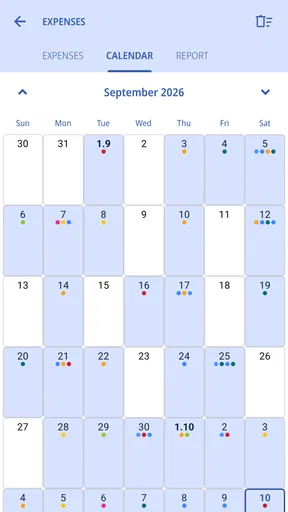
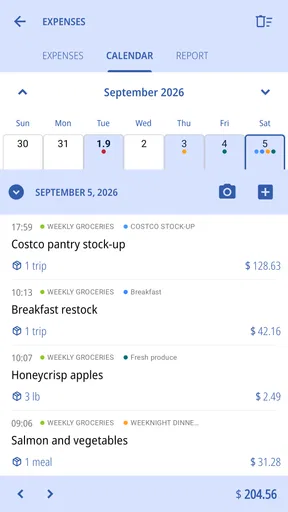
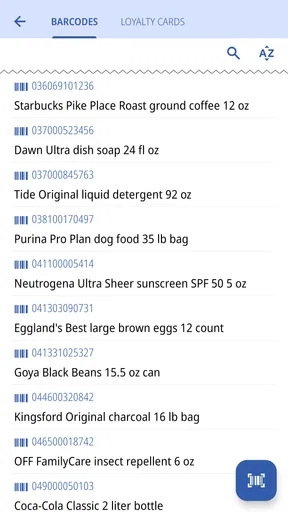
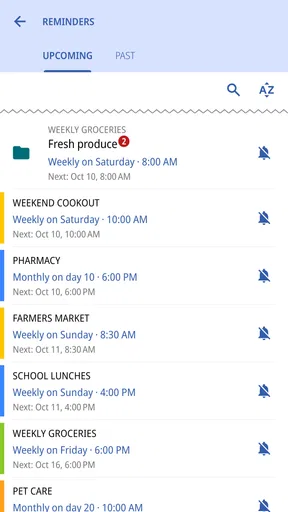
 Analysis by AppCompare
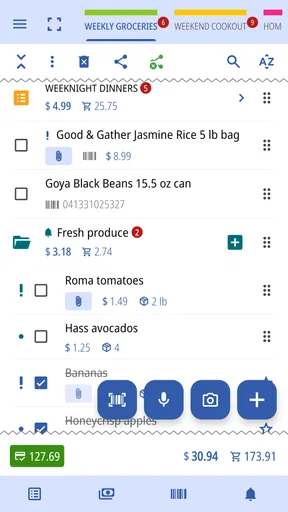
When I’m halfway through a grocery trip and can’t remember whether I added coffee, I want a list I can build quickly and check without fuss. Shopping List is a free shopping app by Enchan Li, and its most useful idea is that a list can be created in more than one way: by speaking, scanning a photo, or using a barcode, as well as by typing. That flexibility can make the small task of remembering what to buy feel less like homework.
Its voice and scanning tools are most appealing when your hands are busy or the item is already in front of you. Rather than treating list-making as a single typing exercise, the app offers shortcuts for capturing shopping needs, then adds practical tools for quantities, organization, and estimating the bill. I find that combination more valuable than a long menu of features: the point is to get a usable list ready before I reach the store.
Adding items without stopping to type
Voice entry is a natural fit for moments when an item comes to mind while cooking, unpacking groceries, or moving around the house. I can capture the thought before it disappears instead of telling myself I’ll remember it later. Photo scanning and barcode entry offer other ways to bring an item into the list, particularly when I have packaging nearby and don’t want to type a product name manually.
These options are useful shortcuts, not a reason to stop checking the list. A voice command may need a quick correction if a product name or quantity is misunderstood, and a scanned item still deserves a glance before I rely on it. My practical approach is to capture first and tidy up later: confirm the item, add a quantity or note if it matters, then move on. That keeps the fast-entry tools helpful without assuming they will get every detail right.
Getting Started with Shopping List - Enchan Li
First off, downloading Shopping List - Enchan Li was a cinch. Head over to your app store, hit download, and you’re all set to start organizing your grocery adventures. The user interface is super friendly, and even if tech isn’t your forte, you’ll find it as easy as pie to navigate through the app.
Once you launch the app, you’re greeted with a clean and straightforward layout. No flashy distractions here, just pure functionality. The app lets you quickly add items to your list, and you can even categorize them by sections like produce, dairy, or snacks. This feature is an absolute gem when you’re trying to zip through the store without backtracking a million times.
Features That Make Life Easier
One of my favorite features is the ability to share your list with others. Imagine this: you’re prepping for a weekend barbecue, and everyone’s pitching in. With a quick tap, you can share your list with friends or family, making it a team effort. Plus, any updates to the list are synced in real-time, so you’ll always be on the same page with your shopping buddies.
Worth Reading Before You Choose

EA SPORTS FC Mobile 26 Is a Bigger Football Game, but It Takes Time

Flipboard Shows What News Apps Must Do Beyond the Feed

Switching to Android Auto Means Rethinking Your Driving Routine

Google Calendar Makes a Crowded Week Easier to Manage

Ludo King Makes the Most of the Minutes Between Plans

Baby Panda World Brings Quick Play to Modern Phones, but Its Game Library Feels Busy
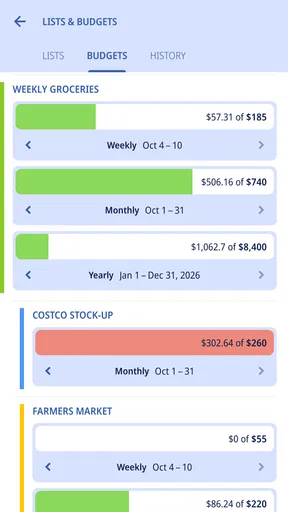
Another standout feature is the price comparison tool. You can add estimated prices to each item, and the app tallies up your expected total. This way, you can avoid those shocking checkout totals. Plus, if you're a budget-conscious shopper like me, this feature is a game-changer for planning your weekly grocery budget.
Organizing Like a Pro
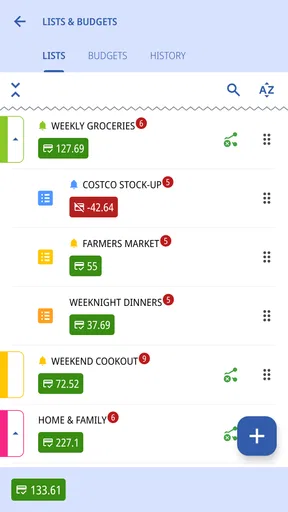
Now, let’s talk about organization. The app allows you to create multiple lists, which is perfect for planning different events or keeping separate lists for different stores. It’s like having a personal shopping assistant in your pocket.
There’s also an option to add details to each item, such as quantity or specific brands. This is particularly handy if you’re picky about your peanut butter or need to grab gluten-free options. The app remembers your preferences, so once you’ve set it up, future shopping trips are smooth sailing.
Why You’ll Love It
What really sets this app apart is its simplicity wrapped in powerful features. You won’t find yourself fiddling with unnecessary options or getting lost in complicated menus. Everything you need is right at your fingertips, making your shopping experience efficient and stress-free.
And let’s not forget the personalization aspect. The app’s ability to remember your frequently bought items and suggest them for future lists is like having a digital assistant that learns and adapts to your needs over time.
Using the list on a real grocery run
Picture a weekday evening: I notice we’re low on rice while making dinner, hear someone mention fruit for breakfast, and spot an empty detergent bottle by the laundry. I can capture those needs as they come up, then sort the list into the store sections I actually walk through. Before leaving, I add quantities and any important brand or dietary note. At the shop, the list becomes a route guide rather than a memory test, and the estimated prices help me keep an eye on the basket total as I go.
A small but useful habit is to separate “must buy” items from things that can wait, using distinct lists or clear item details. That way, a tight budget or a quick stop doesn’t force me to reconsider every optional purchase in the aisle. For shared errands, I’d also agree with the other shopper on who is picking up which items; a shared, changing list is handy, but a quick plan helps prevent two people from buying the same thing.
Where it differs from a basic notes app
A plain notes app can hold a grocery list, and it may be the better choice if you only need a few words and already use it for everything. Shopping List has a more specific purpose: item entry methods such as voice, photo, and barcode capture sit alongside categories, quantities, multiple lists, and price estimates. That makes it more useful when a shopping routine has enough detail to benefit from structure, rather than just a short reminder.
It is not a replacement for a retailer’s own shopping app if your main goal is browsing that store’s catalogue or completing an online order. I’d choose this app for planning what I need across a household or for keeping a budget-conscious list; I’d choose a store-specific option when product availability and checkout are the central tasks. The distinction matters: this is a list-making tool, not a promise that every item will be matched to a particular shop’s stock or prices.
Keeping the budget estimate useful
The total is only as helpful as the estimates entered. I treat it as a planning guide, not a guaranteed checkout figure: prices can vary, and an estimate can become stale if I haven’t updated it. For a dependable routine, I’d enter prices for the items that regularly affect my spending most, then use the subtotal to judge whether the rest of the basket still fits my plan. There is little benefit in carefully pricing every small purchase if that process makes me stop using the list altogether.
There is also a practical trade-off between speed and precision. Voice or barcode capture can get an item onto the list quickly, while a specific size, brand, or dietary requirement may need a note afterward. I would not assume a scanned entry automatically records every detail I care about. A brief review before shopping is the sensible middle ground: it catches a mistaken item and makes sure the list reflects what the household actually needs.
Who is likely to get the most from it
I’d recommend it to people who shop for more than themselves, keep separate lists for different errands, or often remember groceries at inconvenient moments. The combination of flexible entry, organization, and a running cost estimate is especially suited to someone who wants a repeatable weekly routine without turning meal planning into a complicated project. It can also help occasional shoppers who need brand or quantity reminders that a bare checklist would not preserve clearly.
If you prefer the absolute minimum—one short list, typed by hand, with no need to sort or estimate—your phone’s built-in notes may be quicker. Likewise, if the voice and scanning methods don’t fit how you shop, the app’s strongest distinction may matter less to you. Shopping List is free to install, rated for Everyone, and has optional in-app purchases listed at $2.49 per item; I’d start with the free experience and decide whether any paid item is relevant to my own routine rather than paying for features I may not use.
A few details worth knowing before you settle in
The app has an average rating of 4.3 from around 2,100 ratings, with roughly 26 written reviews, and has passed 100,000 installs. Those figures suggest it has found an audience, but they don’t tell me whether its particular entry methods suit every shopper. The current version is 2.12.8, it was released on December 13, 2023, and it runs on Android 7.0 or later. The developer is Enchan Li.
For a first run, I’d avoid building a huge catalogue before testing the workflow. Start with one ordinary grocery trip: add a few items by the method you expect to use most, add one quantity or brand note, and enter estimates for a couple of purchases. That reveals quickly whether voice, scanning, and the budget view save enough effort for you. If several people will use a shared list, try a small errand together first so everyone knows how changes appear and what information needs to be recorded.
A Few Final Thoughts
In the end, Shopping List - Enchan Li is more than just a shopping list app; it's a tool that transforms how you approach grocery shopping. Whether you’re a meticulous planner or a last-minute shopper, this app has something to offer.
So, the next time you’re gearing up for a trip to the store, consider giving this app a try. Who knows? You might just find yourself enjoying your shopping trips a little more, knowing that you’ve got everything under control. Happy shopping!
Pros
- Intuitive interface for easy navigation.
- Customizable lists to fit personal needs.
- Syncs across multiple devices seamlessly.
- Voice input for quick list creation.
- Offline access available anytime.
Cons
- Limited integration with other apps.
- Ads can be intrusive at times.
- Premium features locked behind a paywall.
- No barcode scanning feature.
- Occasional sync delays reported.
FAQs for Shopping List - Enchan Li
What features does Shopping List - Enchan Li offer?
Shopping List - Enchan Li offers a range of features designed to streamline your shopping experience. These include the ability to create multiple lists, categorize items, set reminders, and share lists with others. The app also supports voice input and barcode scanning, making it easier to add items quickly.
Is Shopping List - Enchan Li available on both Android and iOS?
Yes, Shopping List - Enchan Li is available for both Android and iOS platforms. You can download it from the Google Play Store for Android devices and the Apple App Store for iOS devices. This ensures that users on both platforms can enjoy its features seamlessly.
Does Shopping List - Enchan Li require an internet connection to function?
Shopping List - Enchan Li primarily functions offline, allowing you to create and manage lists without an internet connection. However, certain features, such as syncing with cloud services or sharing lists with others, will require an internet connection to operate effectively.
Are there any in-app purchases or ads in Shopping List - Enchan Li?
The app is free to download and use. While it does include ads, they are minimally intrusive. There is also an option for in-app purchases to remove ads and unlock premium features, providing a more enhanced and ad-free experience for users who choose to upgrade.
How user-friendly is Shopping List - Enchan Li for beginners?
Shopping List - Enchan Li is designed with user-friendliness in mind, featuring an intuitive interface that's easy for beginners to navigate. The app includes helpful tutorials and tips to guide new users through its features, ensuring a smooth and enjoyable shopping list creation process.


